Tools
In addition to the record of birds and pairs, Mis Plumas includes a set of tools designed to help you in the day-to-day of the aviary.
Calculator
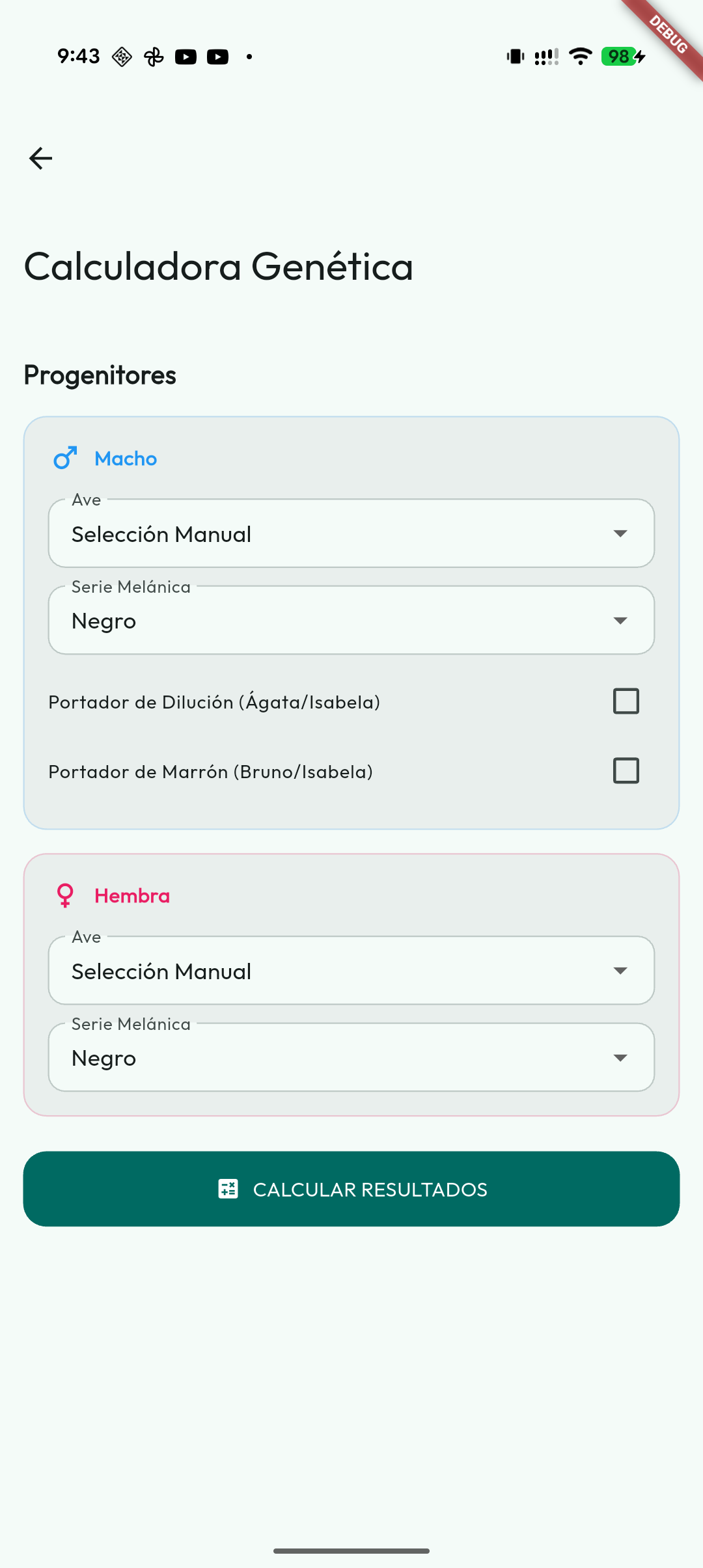
Do you want to know what offspring you can expect before pairing two birds? The Genetics tab in the calculator tells you instantly, without you having to do the maths.
How to use it, step by step:
- Open Genetic Calculator from the side menu.
- Choose the sire and the dam from among your registered birds, or pick a species manually to simulate a cross.
- Adjust visible mutations and carriers if you need to complete the simulation.
The app will analyse the genetic information of both and will show you:
- The possible colours and mutations of the offspring, with the probability percentage of each one.
- Results split by males and females when the scenario calls for it, especially with sex-linked factors. They are probabilities of the cross, not the sexing of a particular chick.
- Which offspring may come out as carriers of a mutation even though they don't show it visually.
- Whether any combination can produce rare mutations, incompatibilities or lethal cross warnings.
- A summary that you can export to keep or share.
Important: For the results to be accurate, the parents must have their genetic record complete. If they are missing information, the calculator will work with what is there but may not show all the possible outcomes.
The Calculator brings together three tabs: Genetics, Inbreeding and Hybridization. This lets you review genetic results, pair kinship and hybrid crosses from the same place.
Supported species and scenarios
The calculator adapts automatically to the type of birds you select:
- Canaries: colour crosses, classic melanins, lipochromes, categories, factors and carriers.
- Cockatiels: autosomal recessive crosses, sex-linked recessive, co-dominant SF/DF like
Edged,Cream FaceandPastelface, combinations such asIno + Whiteface, and factor/carrier selection where applicable. - Siskins: all of them, the Eurasian siskin included, except the red, hooded and black siskins, are crossed mutation by mutation, each in its card under Species mutations:
BrownandPastelas recessives that are not sex-linked —a female can be a carrier—, andSíliceandItalian yellowas dominants. - Red, hooded and black siskins: three cross modes —Sex-linked melanic, Autosomal recessive Topaz and Single / double dilution— and, below them, under Species mutations, a card for each of its other mutations:
Rubino,Sílice,Aminet,Phaeo,JaspeandIvory. The summary combines the result of the chosen mode with those cards; Pastel, Pastel-Brown, Topaz and Dilute have no card because they are crossed in the modes. If the bird's record has theBrownseries andPastel (ex Agate)noted separately, the calculator loads them asPastel-Brown (ex Isabel). A bird without mutations shows as “Normal”. - Gouldian finch: genetics by zones. The calculator crosses the head, the breast and the back separately, prefills the data from your birds when you select them and shows the offspring of each zone with its mutations and carriers.
- Agapornis: factor-by-factor crosses for
roseicollis, eye-ring species,tarantaand rare/historical cases. Mutations with clear inheritance are calculated; rare, multifactorial or derived factors are shown as non-calculable to avoid inventing probabilities. - Budgerigar and Monk Parakeet / Quaker: closed factor profiles with dominant, recessive, sex-linked and single/double-factor traits where applicable.
- Wild species: the goldfinch, greenfinch, serin and the Erythrura finches have their own genetics, indicating whether the chick comes out mutated or as a carrier of the mutations specific to each species. Greenfinch includes mutations such as Yellow, Amber, Citron and Sapphire.
- Other species: you can use the manual mode; if there is no specific scenario, the app uses the general logic available as a guideline.
In all scenarios the calculator shows the Punnett square, so you can see visually how the factors of both parents combine. Everything appears in the app's language, including the mutation names and the Punnett square of each card.
When you cross several factors at once, the summary gathers every combination: the twelve most likely for each sex stay in view and the others unfold, with how many they are and how much they add up to. For cockatiels, the cross of two different mutations also lets you say what each parent carries of the other's mutation —nothing, carrier or visible—, and it fills in by itself when you choose the birds.
When you pick a registered sire and dam, the calculator tries to fill in the scenario from their visible mutations and carriers. If you only want to simulate, you can pick a species manually without creating the birds beforehand and mark mutations or carriers from the calculator itself. If you remove both birds, the cockatiel and Spinus calculators go back to how they were at the start; the canary one keeps whatever you chose by hand.
In canaries, a male carrying both Agate and Brown can carry them in two ways, and his offspring change depending on which. You choose it in Double carrier variant: Pasaportodo, if both are on the same chromosome —the male carrier of Isabel—, or Double carrier (alternative), if he carries one on each chromosome. It fills in by itself from the male's record —a carrier of Isabel or of Pasaportodo (Isabela) is a Pasaportodo; a carrier of Agate and of Brown noted separately, the alternative— and you can change it by hand. In the results, those males are also told apart: “carrier of Isabel (Pasaportodo)” versus “carrier of Agate and Brown”, which is what you get, for example, from an Agate male with a Brown female.
If the cross can produce chicks with the double factor of Dominant white, Intensive or Crest, which is lethal, they are not listed among the ones that hatch: in Probable Results they are grouped at the end of each sex, in the row “Non-viable (lethal double factor: …)”, and that mutation's card warns you. The Lethal cross warning at the top is kept for what no card calculates, such as Black skin. Warnings are informational: the calculator does not decide for you, but flags known risks so you can weigh up the pairing.
Possible carriers are shown as a warning and are not used to calculate percentages. You can study a hypothesis in a manual simulation without changing how certain the record is.
Export to PDF
Exports live next to the data they belong to; there is no general Tools screen:
- export the visible inventory from the Birds list;
- export its record, genealogy or health history from a bird's page;
- export an individual health history from Health, including treatments, events, notes and related attachments;
- export the statistics as CSV, HTML or PDF from Aviary summary;
- Light plan lets you export its calendar as PDF and CSV;
- create PDF sheets of QR codes from the Birds, Pairs and Cages lists.
When generation finishes, the app offers sharing, printing or saving where the format supports it. PDFs use the common Mis Plumas identity, including aviary details and logo when configured. CSV, HTML, XLSX and ZIP files offer sharing and saving; printing is reserved for PDF.
QR codes
Mis Plumas can generate QR codes to quickly open records and locations from the phone's camera.
You can customise their look from Settings → Appearance → QR style, with your own shapes and colours for the bird, pair and cage QR codes.
In addition to individual QR codes, from the Birds, Pairs and Cages lists you can generate a printable QR sheet. The app starts from the items currently visible, respects applied filters and lets you untick any codes you do not want to include.
Generate a QR sheet
- Open the Birds, Pairs or Cages list.
- Tap the QR icon in the top bar.
- Review the selection —the search box finds a ring, a cage or a group— and use Select all or None if needed: they act on what is shown; what is ticked but hidden stays in the sheet.
- Choose the number of columns per page.
- Generate the sheet and decide whether to share, print or save it.
The sheet uses your configured QR style. Changing the number of columns lets you print larger or more compact codes depending on the labels you will use.
Generate a bird's QR
- Open the bird's record.
- Tap the QR button.
- The QR code appears, ready to share or print.
Generate a pair's QR
- Open the pair's detail.
- Tap the QR button.
- Save or share the code if you want quick access to that pair.
Generate a cage's QR
- Go to Cages.
- Open the cage or use the QR action from the list.
- Print or share the label and stick it on the physical cage.
The new cage QR uses a permanent identity, independent of the alias and of the visible code; it follows the cage through merges and splits. Older code-based QRs also try to find the current location. Changing the decorative name does not require printing a new label.
Print labels for the cages
- Open the QR code of each cage you want to label.
- Use the save or share option.
- Print the labels and stick them on the corresponding cages.
Scan a QR
When you want to identify a bird, pair or cage, open Scan QR, point the camera at the code and the app will open the corresponding screen. No searching, no typing.
For converted or merged cages, the app tries to take you to the equivalent current location and shows a notice if the old code has been redirected.
Hybridization
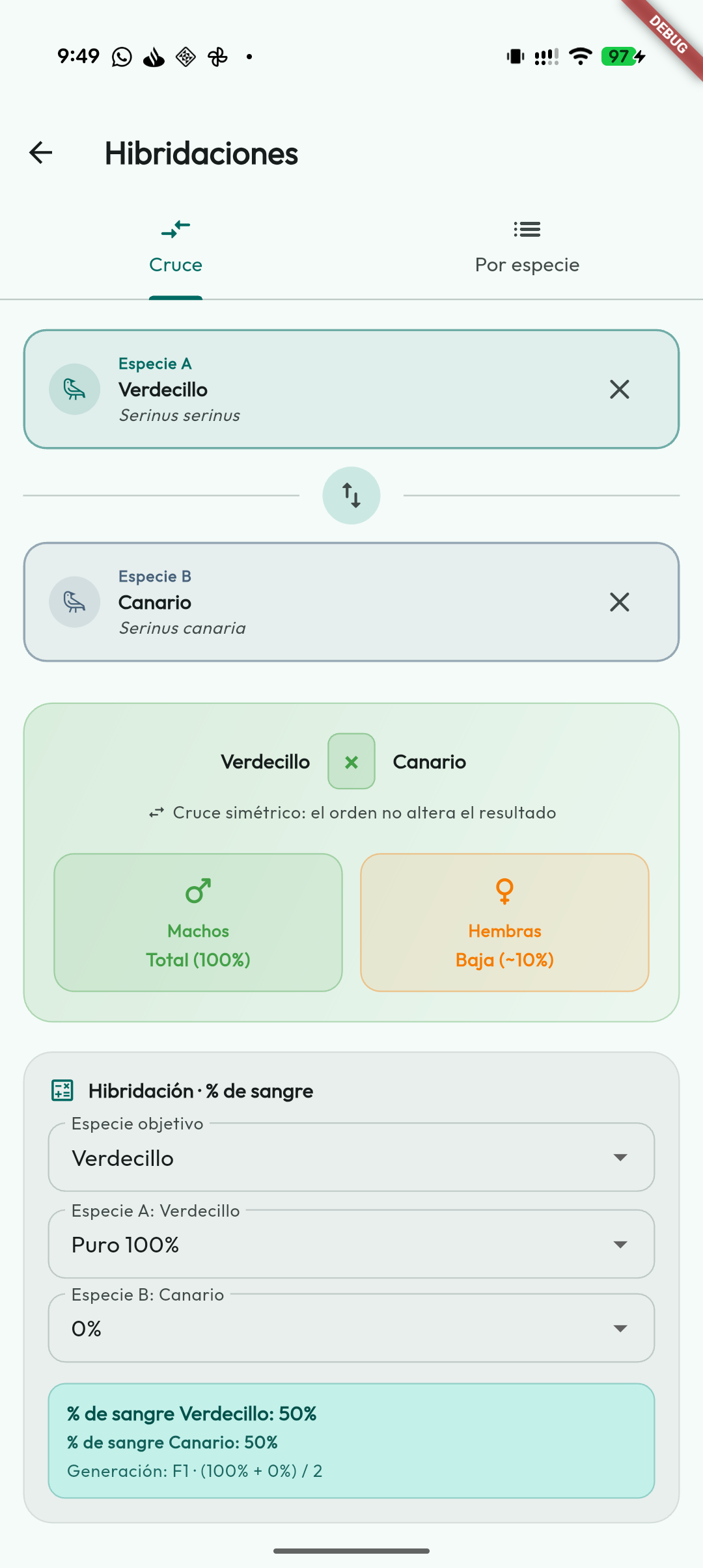
Are you crossing two different species and want to know what blood ratio the offspring will have? This tool helps you plan a hybridisation and back-cross programme.
How to use it:
- Open Genetic Calculator from the side menu and select the Hybridization tab.
- Choose Cross to look up a specific cross between two species, or By species to see all the possible crosses with a species.
- Select the two species you want to cross.
The app will immediately show you:
- The % of blood of each species in the offspring.
- The resulting generation (F1, R1, R2, R3…).
- Whether the cross is symmetric (male/female order does not affect the result) or not.
- The estimated viability by sex (some crosses only produce fertile males, for example).
Practical example: if you cross a Serin with a Canary you get F1 offspring (50% of each species). If you then back-cross that F1 with a pure Canary, the offspring will be R1 (75% Canary). The calculator works it out automatically as you advance through the breeding programme.