Pairs and clutches
Tracking breeding is one of the strengths of Mis Plumas. From the moment you form a pair until the last chick is ringed, the app walks you through every step of the process.
For cases where you need foster mothers, need to move clutches or want to use an incubator, see also Assisted breeding.
Creating a pair
- Go to the Pairs section from the side menu.
- Tap the “New Pair” button.
- Choose the male and the female from among your registered birds.
- Give the pair a name or number if you want to identify it easily.
- Tap Save.
In the male and female pickers you can search by ring and also by the name or alias you have set for the bird. This is useful when you work with many specimens and don't always remember the exact ring.
A male can be in several active pairs; the app tells you how many he has. A female can only be in one active pair: those already taken appear dimmed, showing their pair, and cannot be selected until that pair is separated.
Unsexed birds appear in both pickers. When you choose one, the app asks you to confirm the sex it will save on its record. Birds On loan remain candidates because they are still in the aviary; birds that have already left are not offered for new pairs.
If it detects kinship between the birds, it can also show an inbreeding warning to help you decide with more information. The warning does not block saving, but is visible so you can review it.
It can also warn of lethal or not-recommended crosses when both parents share known risk factors, such as dominant white, intensive, crest or complex combinations like black skin. This warning does not block saving either: it is there so you can review the cross before continuing.
In both list and grid view, each pair shows the cage where it is housed with its code (for example C15) and, if the cage has an alias, the alias is shown alongside the code. The screen's ⋮ menu gathers the view switch, the QR codes and the seasons; the sort order has its own button next to it. The order you pick —by cage, newest or oldest first— is remembered and travels with your account to your other devices.
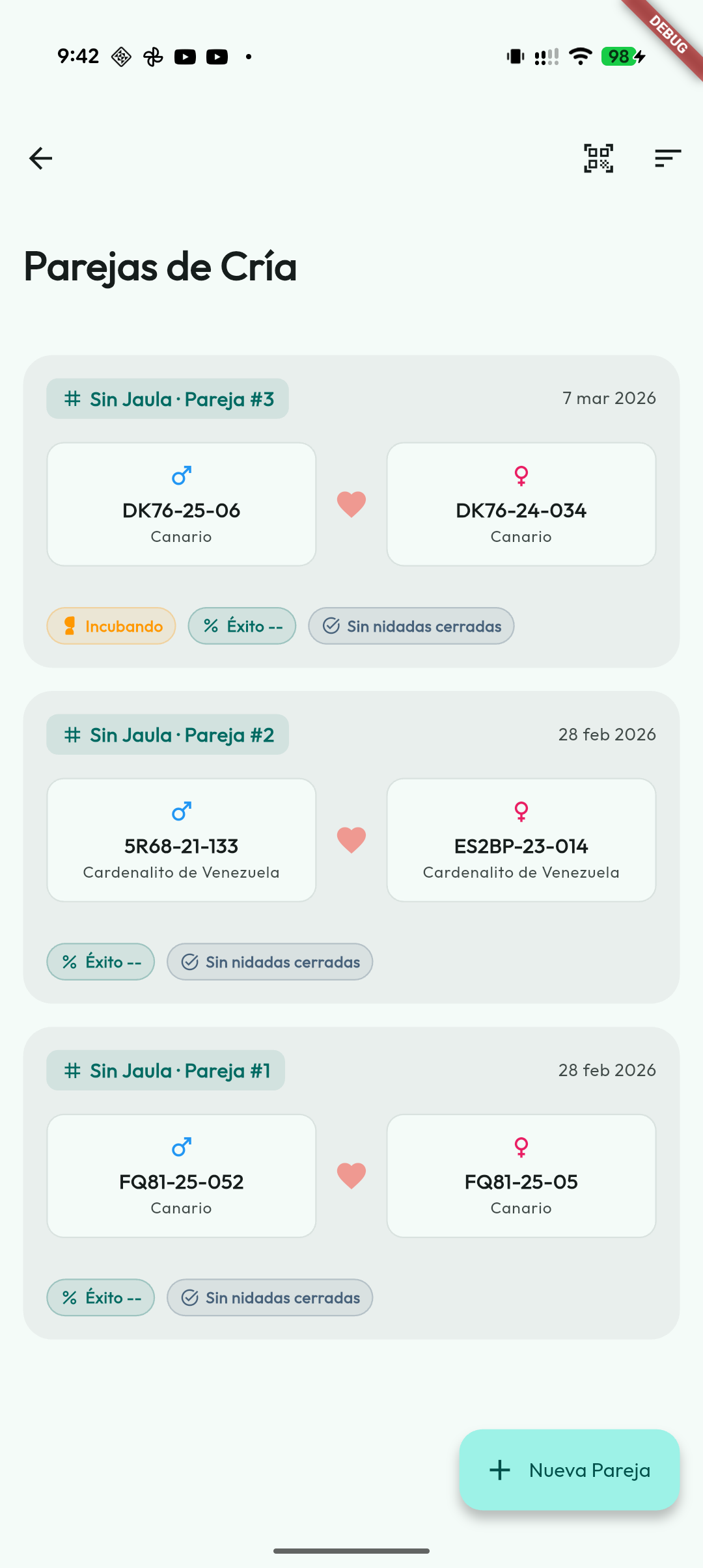
Pair statistics
In each pair's detail you will find a statistics block that summarises its breeding performance over time:
- total number of clutches;
- eggs recorded;
- chicks hatched;
- chicks alive and deceased;
- specimens weaned;
- overall success rate.
This way you can assess at a glance how each pair is breeding without having to go through clutch by clutch.
The success rate is computed the same way across the app: independent chicks divided by the eggs already evaluated —eggs still incubating do not lower it—. Until any egg has told anything you will see "No eggs evaluated" instead of a 0%.
The sheet's actions —QR, notes, edit, breeding report, separate and delete— live in its ⋮ menu, each with its icon and name.
With the Feeding module on, next to an active pair's cage you see the plans due today for its two birds or for the chicks they raise —each one opens its What's in it— and Plan for this pair.
Breeding report
The Breeding report is a PDF with one page per pair, sorted by cage: its two birds, every clutch —dates, eggs, failed, hatched, ringed or independent, dead, who is incubating them today and the nest—, the ringed chicks of each clutch, the totals and the pair's notes. With several pairs, the first page is a summary with one line per cage.
You ask for it from the ⋮ menu of the Pairs list (the pairs you see, with whatever filter is on, in today's season) or from the ⋮ menu of a pair's sheet. From the sheet you choose between its seasons and Entire history, which gathers all its clutches —including those that fall in no season, labelled "No season"—. You can also ask for it from a season in Breeding seasons and from a cage's sheet.
Chicks come out with the right degree of certainty: those ringed from the clutch, those the app places in a clutch by their date of birth (marked "attributed by date") and, in a separate block, the pair's offspring it cannot place in any clutch, which do not enter the totals. The foster shown in each clutch is the one assigned as of today: the app does not keep who incubated each egg in the past. The PDF opens in the preview, from which you can share, print or save it; generating it does not modify any data.
Pair states
- Active: The pair is together and in full breeding season.
- Laying: the pair is recording eggs of a clutch.
- Incubating: there are eggs in active incubation.
- With chicks: the clutch already has hatched chicks.
- Foster: the pair is raising eggs or chicks assigned from another clutch.
- Historical: The season has ended or the pair has separated. Their data and the clutch history are always kept, even if they no longer appear as active.
The Laying, Incubating and With chicks indicators are worked out from the clutches; you do not change them by hand on the pair. They can overlap, for example when some chicks have hatched and there are still eggs to hatch. A clutch counts as finished when all its eggs or chicks are independent, clear, aborted, broken or deceased.
You can also add pair notes to record observations that don't belong only to the male or to the female.
If the male or the female of a pair becomes transferred or deceased, the app flags it on the pair's card, with its status in colour, so you can spot at a glance which pairs have been left incomplete.
Ending a season or separating a pair
At the end of breeding you can use End breeding season, in the ⋮ menu of the Pairs screen. The app shows how many active pairs will be closed, warns about clutches in progress and skips them by default unless you decide to include them.
You can relocate the male and female to the previous cage, the origin cage, keep them where they are, send them to a new cage or leave them without a cage. When choosing a new cage, the app first shows the available aviaries, because that is usually the most common destination after undoing pairs; you can also show other cages if needed.
The Separate pair action from the detail of an active pair applies the same flow to a single pair. In both cases the pair is not deleted: it is archived with an end date, keeps its clutches and appears as historical. Finished pairs show an Ended label.
If the app does not have enough history to know the previous or origin cage, it keeps the bird in its current cage and reports it when finished.
Delete a pair created by mistake
Separating or ending a season archives the pair: it stays as historical in the history of both birds. If instead you formed a pair by mistake and want to remove it entirely, use the trash button: you'll find it next to each pair in the history on the bird sheet, and also on the pair detail. Since the pair is the same one for the male and the female, deleting it removes it from both histories.
To protect your data, if the pair has recorded clutches it is not deleted —you would lose those clutches and their offspring—: in that case the app offers to separate it and archive it instead.
You can check the active season and the previous ones, with their number of pairs and their status (active or ended), from the Breeding seasons screen, opened from the ⋮ menu of the Pairs screen. Tapping a season lets you view its statistics, change its year or reopen it.
Registering a clutch
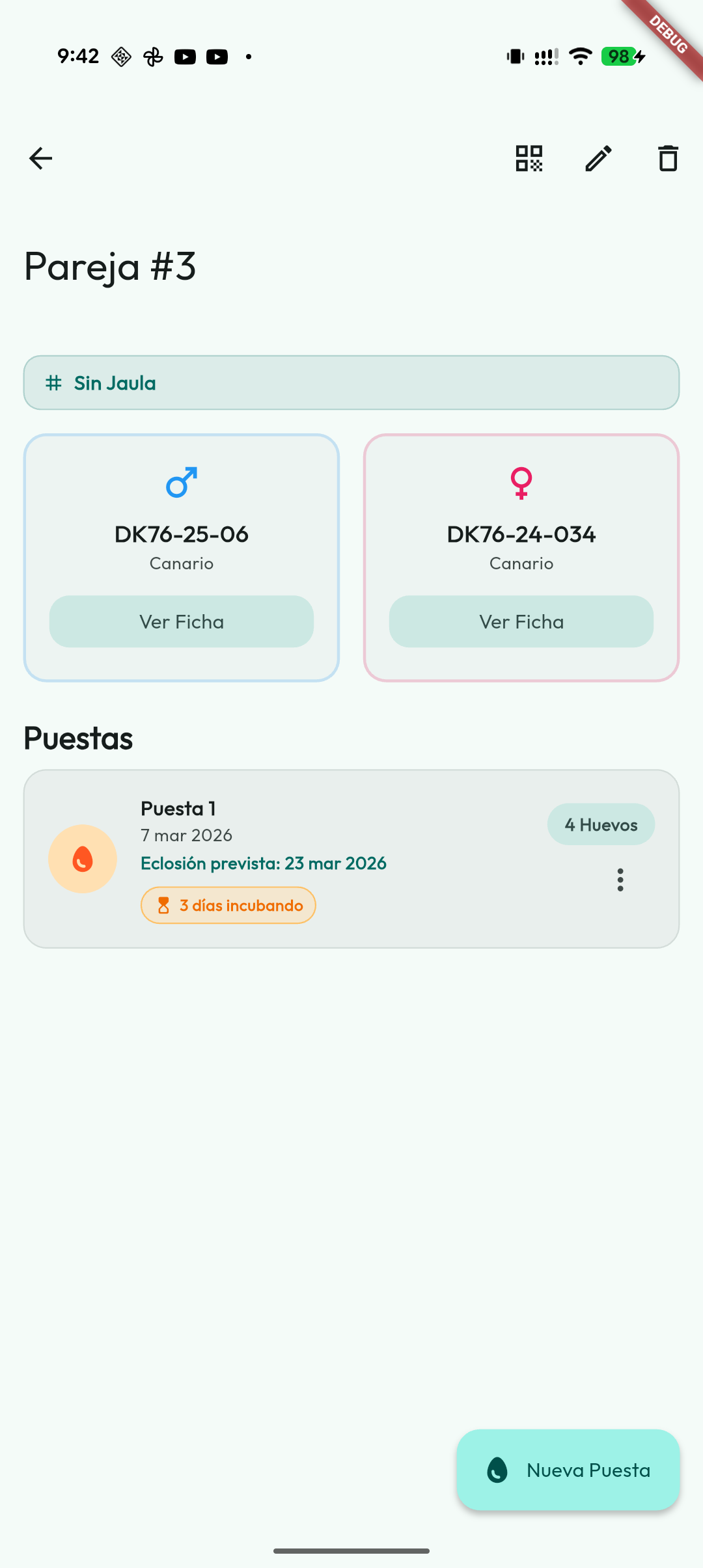
Inside the details of an active pair you will find its clutch history. To start a new one:
- Tap “New Clutch”.
- Keep adding the eggs one by one as the female lays them (you can do it daily).
Clutches with unknown father
Sometimes you know which hen laid, but not with which cock: in an aviary with several cocks, or with a hen that arrived already carrying eggs. That clutch is recorded with the mother only:
- Open the hen's record.
- Under Clutches with unknown father, tap Record a clutch with unknown father.
- Fill in the clutch like any other and tap Create clutch.
If you use Nests, it works the same way in a nest assigned to the hen: New clutch and, when asked which cock, Unknown father.
- The app never invents a cock or creates a pair. The chicks of that clutch get their mother and no father; if you find out later who he is, you can add him on each chick's record.
- If the hen has an active pair, the app warns you first: if the eggs belong to that pair, record them from the pair.
- The clutch appears on the hen's record (and in her nest), not under any pair. A clutch with unknown father cannot be moved to a pair later, nor the other way round.
- With cloud sync, devices running a version older than 6.2.0 do not see these clutches until they are updated; the chicks do reach them.
Tracking the eggs, step by step
Step 1 — Mark the start of incubation
When real incubation of the eggs begins, tap “Incubation start” and indicate the date. From that moment, the app calculates the expected hatching date based on the species' incubation days and schedules the fertility alert if it is enabled. The alert days are set in general or per species under Settings → Notifications; the initial general value is 7 days.
You can enable or disable the fertility alert in Settings → Notifications → Fertility reminder.
A pair incubates only one clutch at a time: if another of its clutches is still incubating in its nest, the app does not let you start this one and tells you so. Eggs that are in an incubator or with a foster do not count, because the pair is not the one keeping them warm: with this clutch —or the previous one— entirely in the incubator or with fosters, you can start it. Assign the incubator or the foster first and set the date afterwards.
Step 2 — Record the candling result
After a few days, you can update the status of each egg according to what you see when you candle it:
- Fertile: It has an embryo, all is well.
- Clear: It is empty, it was not fertilised.
If you have enabled the Incubator module, you can also send eggs to an incubator or hatcher from the clutch detail. The app keeps the clutch's biological parents, but records the physical handling of the egg inside the machine.
Step 3 — Hatching
When a chick is born, mark it as Hatched and indicate the date. The app will automatically activate a ringing alert for that chick.
With the Feeding module on, a clutch with chicks shows Chick feeding: their age (“Chicks aged 5 to 9 days”), what is due for them today and what comes next (“Next: Sprouted seeds from day 14 (in 5 days)”). It is the only place where you see what a chick that is not ringed yet eats; those in an incubator get nothing.
Step 4 — Ringing
The ringing alert is worked out from the actual hatching date of the oldest chick still to be ringed, with the days you have set in general or per species. Failed eggs (clear, aborted or broken), chicks that died and eggs still incubating neither delay nor block it; once you ring the oldest chick, the alert moves on to the next. When you ring the chick, mark it as Ringed and enter the number. It is registered as a new bird, initially Unsexed, with its biological parents. You do not need to add it again from My Birds.
When ringing a chick from the clutch, the app proposes the ring size: the larger of its two parents (father 3 mm and mother 2.7 ⇒ 3). You can change it before confirming; it is saved in the chick's card. With Weighing on, the same sheet also asks for the Weight at ringing (g): it becomes the chick's first weighing.
Afterwards you can wean it into a cage or leave it with No Cage if you have not prepared its place yet. Ringing it does not, on its own, finish the clutch.
Other possible states
- Broken or aborted: The egg did not make it. It is recorded and stays in the history.
- Clear: the egg was not fertilised. It is kept as part of the tracking, but is not treated as hatched.
- Deceased: if a chick dies, you can mark it as deceased and enter the date. With hatch date and death date, the app calculates how many days it lived.
Once an egg is marked as hatched, the app prevents accidental rollback actions and keeps the hatching date.
Hatching the whole clutch at once respects the clear, aborted or broken eggs: it does not turn them into chicks.
These data feed the aviary breeding summary, where you can review hatched, alive, deceased and weaned chicks, plus mortality patterns in the first days of life.
If you change a species' incubation days in Settings, you can use Recalculate hatching from the clutch to update the expected dates.
Foster hens
If a pair cannot take care of its clutch (because of rejection, illness or another reason), you can assign that clutch to another bird marked as a foster or to a complete foster pair.
How to do it:
- Open the clutch you want to move.
- Tap “Foster Mother”.
- Choose the foster bird or foster pair that will take over. The sheet has a search box and species and year chips; foster pairs stay fixed at the top.
The overall foster applies to the clutch, except for the eggs or chicks with an individual foster, which takes priority. This lets you split a clutch between several fosters without losing the biological lineage: the actual parents stay the same. An egg inside an incubator cannot have a foster at the same time.
The app shows each foster's active load and warns if it already has eggs or chicks assigned. It is an informational notice, not a block. From the clutch or each egg you can use Go to foster mother to open the bird profile or the foster pair detail. A foster you have deleted still appears with its ring and “(deleted)”, also on the pair's page and in the breeding report, but you can no longer go to its record.