Home screen
When you open Mis Plumas, the first thing you see is the home screen: your aviary command centre. At a glance you can tell exactly how everything stands without having to search for anything.
What does the home screen show?
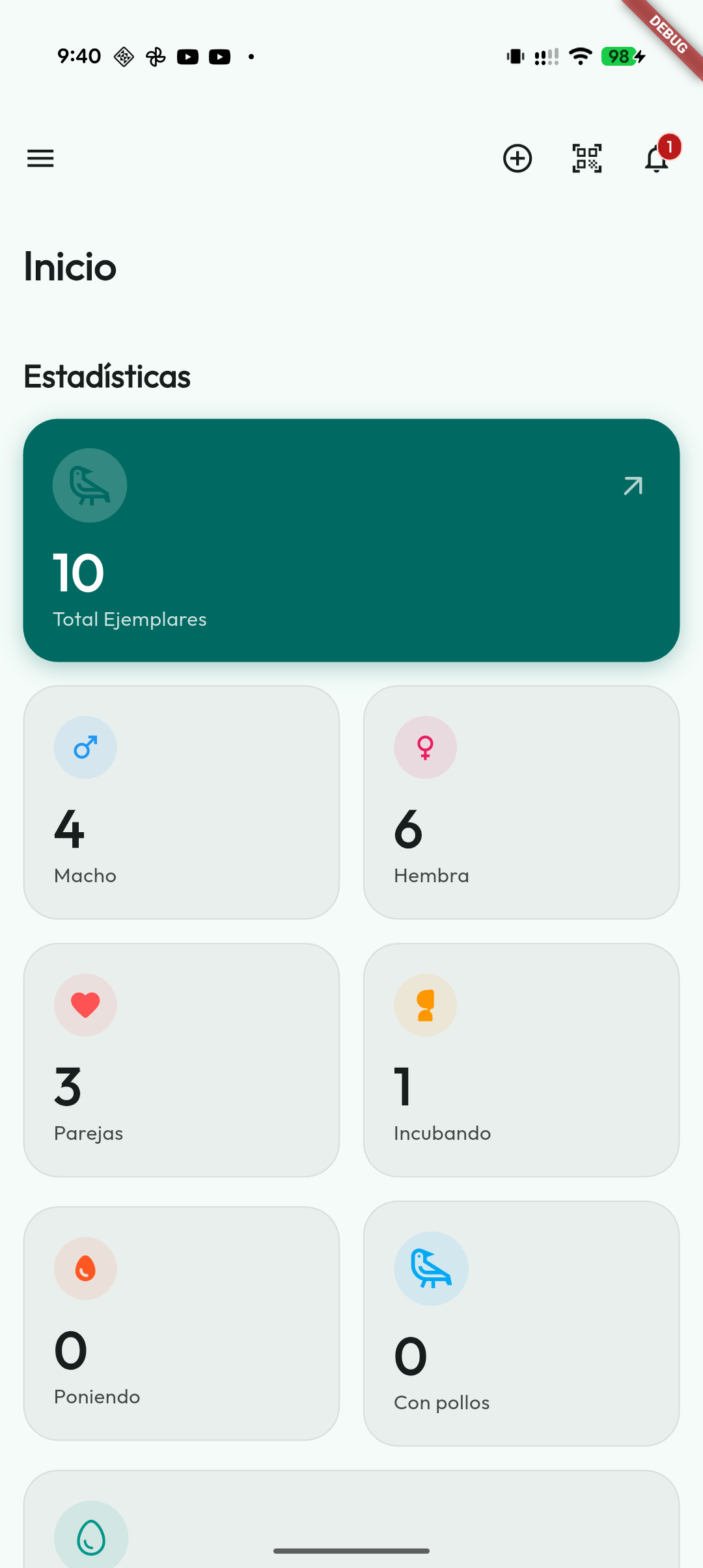
At the top there is a summary with the most important figures of your aviary at this moment:
- Total birds you have registered.
- Males, females and unsexed birds separately; the three counts add up to the total and open their lists.
- Active pairs in the current season.
- Clutches in progress (with eggs incubating or with chicks already hatched).
- Statuses and key operational shortcuts, such as Foster Mothers, Cages, Laying, Incubating, With chicks or Incubators tasks when the module is on, so you can quickly see what needs attention.
- With the Inventory module enabled, the Expiry alerts card shows how many products have expired or are about to expire. Tapping it opens Inventory, so you can see at a glance what needs restocking or removing.
- With the Feeding module on, the Due today tile counts the feeding plans due today and shows the day's news separately. Tapping it opens the Feeding tab in Health.
- With Weighing on inside Health, if any bird has lost more weight than you set in Settings or is below the normal weight for its species, the notice «N birds have lost weight» appears. Tapping it opens the Weighing tab of Health; with nothing to report, it takes up no space.
If Hide birds no longer in the aviary is enabled (the default), Home counts only the birds you actually keep: transferred, deceased, donated and lost birds are excluded from the total and the male/female counts. Use the “Out of the aviary (N)” chip in Birds to display them.
That way, the moment you open the app, you already know how your aviary is doing.
The Aviary summary expands this view with the current population, statuses, species split by sex and yearly breeding figures: eggs and hatched, live, deceased and independent chicks. If you record a chick's date of death, it also helps show on which day of life losses are concentrated.
From that summary you can export all statistics as CSV, HTML or PDF. CSV is useful for spreadsheets; HTML and PDF keep the Mis Plumas design, with the aviary logo and watermark when your breeder identity is configured. See the full Aviary summary guide.
Reminders and alerts
Mis Plumas warns you before anything important slips by. You do not have to keep an eye on the dates: the app does it for you.
The bell and the notifications screen
The number on the Home bell is the alerts for today that have already reached their time and that you have not read yet. Anything due later, later today or months from now, does not count until it arrives. At midnight it goes back to zero: an unread alert from yesterday stops counting, although it stays in the history.
Tapping the bell opens the notifications screen:
- At the top, the Unread today card, with the same number as the bell.
- Today: today's alerts that have already arrived, with their date and time. The ones you have not opened yet carry the Unread label. Opening one marks it as read, and Mark as read marks them all at once.
- Upcoming notifications: only what is still due today, with the time it will go off (for example “At 20:00”).
- Coming days: alerts for the following days are no longer listed here; this entry opens the calendar, where they all are.
- History: alerts from previous days, from the most recent to the oldest.
Tapping an alert expands a bottom sheet with the full content and actions to go directly to the related bird, pair, clutch or link.
What you have read is stored on each device, because each one receives its own notifications. Opening an alert from the system notification does not mark it as read in the bell.
Upcoming hatchings
When a pair has eggs incubating, the app calculates the expected hatching date and reminds you in advance. That way you can have everything ready when the moment arrives.
Pending ringings
The app works out the alert from the actual hatching date and the days you have set, in general or per species, under Settings → Notifications. The reminder helps you check on the chick; it does not decide on its own whether the chick is ready to be ringed.
Fertility reminder
The alert counts from the incubation start. The initial general value is 7 days, but you can change it and set exceptions per species under Settings → Notifications, as well as enable or disable the reminder.
Incubator
If you enable the Incubator module, Home and the calendar can help with turning, humidity, water refills, candling, moving to hatcher and estimated hatchings for eggs inside a machine.
Medical treatments
Clinical treatments recorded on a bird's record appear throughout their active period. For plans created in Health, every day of every schedule creates its own event: the first is labelled Start and the following ones Day N of M. That way you can review which medication or follow-up is due today without searching bird by bird.
The Health screen also lets you record one-off health events, attach documents and export a bird's health history as a PDF.
If you enable the option in Settings, Home can also show a small indicator with the estimated daylight hours of the current day. This option is off by default and asks for location permission when enabled, so the calculation matches your area. Tapping the sun opens a monthly view with the daylight hours for each day and the approximate difference compared with the previous day.
If you have enabled Google Calendar in Settings, the main events are also synced to the external calendar, but Home remains the quickest daily panel for checking what is due today.
Pending transfers
With the Transfers between aviaries module on, Home shows the Transfers and listings card and invites you to connect your account if needed. Each row takes you to its place. Pending items come first: birds waiting to be accepted and received offers to answer. Then Listings on the board, with those of all breeders, which opens the board; Your listings, with the ones you have published, which opens your public profile as others see it (with none, it opens My advertiser profile); and Your birds on loan, which opens the On loan list. Tapping the title opens Transfers and listings. See Transfers between aviaries and Transfer listings.
Sync waiting for a decision
After restoring a backup or importing an aviary, Cloud paused may appear. Open the cloud screen and choose whether to keep what you restored for the whole account or download the cloud aviary again. Until you decide, this device does not sync. If the notice asks you to update the app, install the required version before syncing again.
Navigation
Open the side menu to move around the app. It provides direct access to Home, My Birds, Foster Mothers, Pairs, Cages, Calendar, Genetic Calculator, Show Record, Health, Settings and Cloud sync.
Modules enabled under Settings → Modules add their own entries: Transfers between aviaries, Address book, Nests, Light plan, Incubators, Income & Expenses and Inventory. The Health module is on by default and can be turned off under Settings → Modules: when it is off, its entry disappears from the menu. Feeding has no entry of its own: it is a tab in Health. The Cages card on Home opens the same section as the side menu.